 Points Points!
The right card for the moment.
Compare the cards you own using estimated reward value, so points and cash back are easier to weigh.
Location-aware rewards. Always free.
Set your goals. Make your everyday spending work toward them. Points Points! helps you choose a credit card using your rewards, preferences, and supported goals—with optional recommendations on your Lock Screen when you arrive.
Always free to usePrivacy first
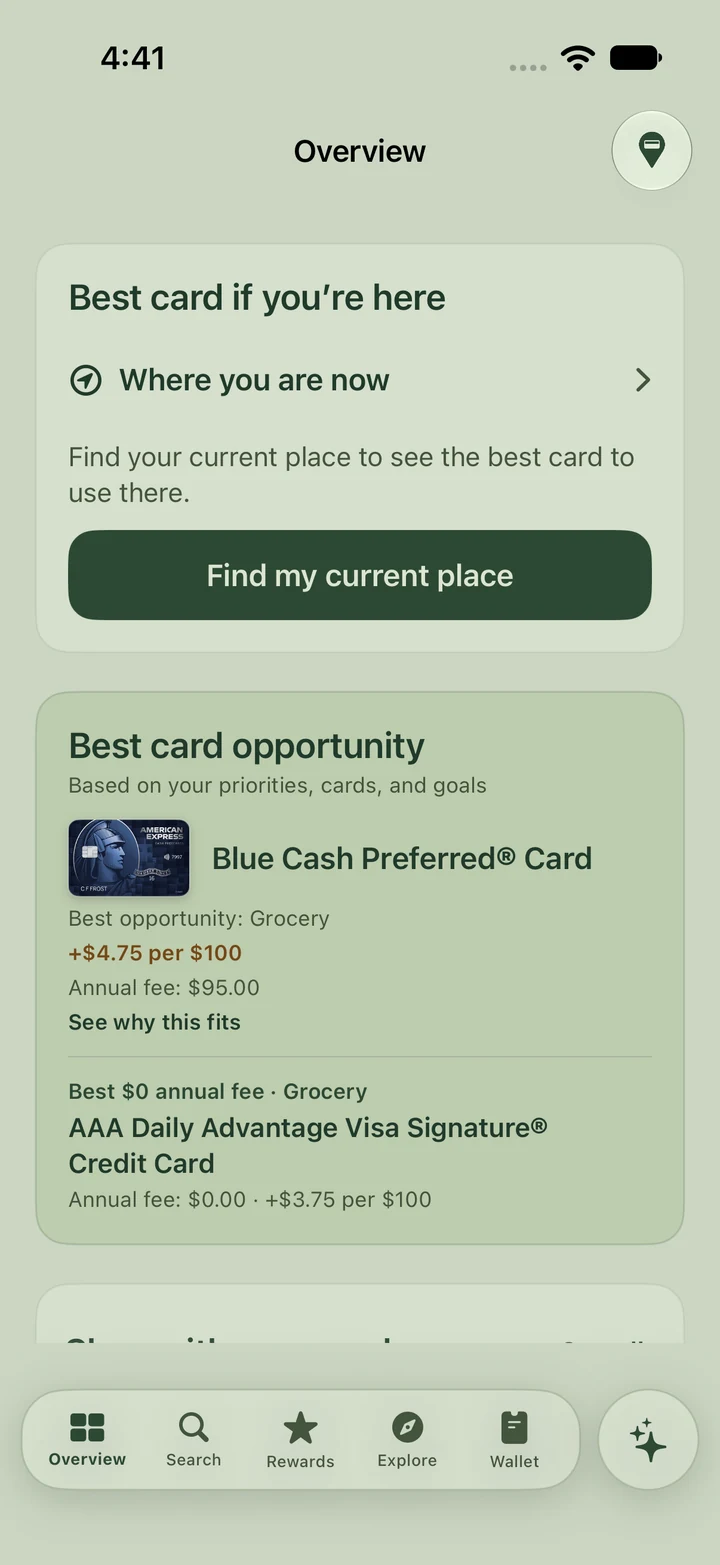
Overview · sage light theme · example setup
Start with what matters to you
A trip on points. A hotel stay. Your next status milestone. Tell Points Points! what you’re working toward, so supported recommendations can reflect what matters to you.
Open Wallet → Goals & Benefits, add a supported goal, and choose the one you want to use for recommendations. Add your program preferences and point valuations to make comparisons more personal.
See how to set your goalsChoose a supported points, program, or status goal that reflects what you want from your rewards.
Your active goal and preferences can shape relevant recommendations alongside estimated reward value.
Give it a personal name, pin it to Overview, and record progress as you go. Pinning keeps it visible; your active goal guides supported recommendations.
The right card. Right where you are.
Arrive at a supported store or restaurant, and Points Points! can recommend a card from your Wallet on your Lock Screen. The answer is in the notification; tap for the explanation.
Enable automatic recommendations, notifications, and background location in the app. Your cards are compared on your iPhone using the reward rules and preferences available there.
See how arrival alerts workOptional and permission-based. Alerts depend on place confidence and iOS background delivery. Search and Nearby are always there when you need them.
 Points Points!now
Use Amex Platinum
At this location · based on your Wallet and settings
Your Lock Screen, a little smarter
Add the Points Points! Best Card Here widget to your iPhone Lock Screen. See a compact card label at a glance, then tap to open Points Points! and check nearby.
Keep the widget beneath your clock and arrival recommendations in your notifications. A helpful card suggestion is close at hand when you’re ready to pay.
About the Lock Screen widgetiOS controls widget refresh timing. The widget can show a last-known recommendation or an everyday default until a new nearby check is available.
Points Points!nowUse Amex Platinum
At this location · based on your Wallet and settingsThe cards you own. The value you deserve.
Compare the cards you own using estimated reward value, so points and cash back are easier to weigh.
Explore credits, subscription benefits, and the conditions that matter before you count on them.
Choose what you’re working toward, add your point values, and bring your priorities into supported recommendations.
Set up your goalsBuilt around your privacy
Who needs another app collecting their personal data? You already have enough of those.
We don’t collect your name, email address, mailing address, payment credentials, or personal wallet and rewards data. Your card selections, loyalty balances, goals, and personalized reward calculations stay on your device. No Points Points! account or bank connection is required. We never sell your data because we don’t have your data.
Read our privacy approachFree to use. Independent recommendations.
We plan to earn money through referrals using affiliate networks and partnerships. If you choose a qualifying partner link, we may earn a commission. Affiliate compensation and partnerships never influence which cards we recommend or how we rank them.
We don’t collect identity, contact, or personal wallet data. We never sell user data to advertisers, affiliate networks, or partners.
Recommendations use reward rules, eligibility, and your preferences. A referral payment never changes the result.
The app’s limited usage analytics and optional third-party services are explained in our privacy details.
Getting started
Select the card products you already own. No account numbers needed.
Open Wallet → Goals & Benefits. Choose a supported goal and your preferred programs for a more personal experience.
Compare your cards in Search or Nearby. Turn on optional arrival alerts for Lock Screen suggestions at supported places.
Always free to use. Privacy first. That’s Points Points!